Tower Building and Submitting#
Building Guidelines#
Don’t create towers too far outside your skill level. For example, don’t create a GODSPEED tower if your hardest beaten tower is a Difficult.
Playtest your tower often, to see if there are any difficulty spikes or drops.
Keep the difficulty consistent throughout the tower. On more punishing parts, such as outsides, the difficulty should be slightly lower to the rest of the tower.
Don’t create repetitive sections, or sections that require waiting. These are ex. the same jump repeated over and over, or a long platform you need to walk through.
If you find any bugs, they should be fixed immediately.
Get feedback from other people. They can see awkward sections and difficulty spikes much easier than you can, since you could have gotten used to how a specific section works, and not notice the problem.
Use the kit creatively. Use 2 different client objects together in an unique way. You can also take inspiration from other towers, and expand on concepts introduced in them.
See also
Golden Rules of Game Design for a longer guide on good gameplay building practices.
Building Rules#
Client Objects have to go in the
ClientObjectsfolder. If there are unanchored parts that other players shouldn’t be able to interact with, you can move them to this folder, so that every player gets their own copy.A Tower must have 10 floors. You can move the floors and modify the frame in any way you like (even completely delete it), but there has to be enough gameplay so that no floor is completely empty.
Steeples are types of towers which have 5 or 6 floors. You can’t normally make and submit them, as they are reserved for events.
Citadels are types of towers which have 10 or more floors. You can make them, but it is not recommended until you have enough tower building experience.
Mini towers have multiple special rules. If you want to make one, ask a helper on the FToH Discord server about it.
Your tower can’t break roblox’s TOS.
Submitting#
Important
Since tower submission is done through the FToH discord server, the guide assumes that you are already in it. If not, you can join the server here.
Attention
If your tower is added to the whitelist, and you want to remove it from it, you MUST give a good reason to do so. Even if you do, it may not be removed from the whitelist due to it already being planned for a future area.
When you have built your tower, and iterated on it from the feedback of others, you can submit your tower for curation.
Go to the #submit-a-tower📩 channel, and click the “📩 Submit” button to create a submission.
In RetroStudio, select the “Tower Kit” folder, and from the top bar select “Insert”, then “Export Model”.
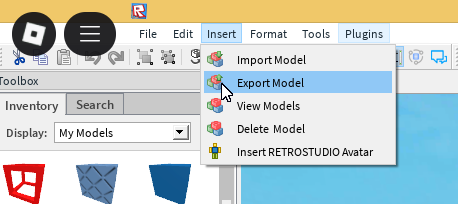
Copy the code that appears in the dialog box.
In the submission ticket, send a message which has the Tower name, creators, intended difficulty and the model ID you copied. Here is an example:
When you have submitted your tower, a curator will review it. They will critique the tower, tell you what you could improve, and give the tower a verdict. Here are the definitions of the verdicts:
- Pass:
The tower is good enough to be whitelisted.
- Fail:
The tower is not good enough to be whitelisted.
- HardPass:
The tower has exceptional quality.
- HardFail:
The tower has so little effort put into it, the creator could be banned from submitting.
- TooGlitchy:
The tower would otherwise be a pass, but it has too many unintentional glitches/bugs, or has a glitch which makes the tower impossible to complete.
- MonthlyPass:
The tower is good enough to be whitelisted as a monthly tower, but not as a permanent tower.
If your tower is added to the whitelist, it will be added to the game in a future content update.
Note
If your tower gets the “MonthlyPass” verdict, you will be asked if your tower can be added to the game as a monthly tower, which is a temporary tower that lasts in the game for a month. Monthly towers have a lower bar of quality than permanent towers.